Cache reads, cache writes, the 5 minute and 1 hour TTL: the token math behind every Claude Code turn, and why a cold cache costs more than no cache at all.
AIagentsclaude-codecache
Every time you press Enter in Claude Code, the model rereads your whole conversation from the first line.
That sounds expensive, and it would be without prompt caching. Caching is the reason a two hour session with Claude Code stays affordable, and also the reason the first message after your lunch break can cost more than the ten before it.
Pricing and token consumption are among the new things developers using AI agents have to learn. To really understand them, you first need to understand how the caching system works. So in this post we will go through it from the ground up: what gets cached, what a cache read and a cache write cost, how the 5 minute and 1 hour TTL work, and what breaks the cache in Claude Code.
Short on time? The whole post is also a two minute video at the end.
What happens to your message, from tokens to the prompt cache, over three requests
The Claude API is stateless. Anthropic’s servers keep no memory of your conversation between two messages. So each time you send something, Claude Code sends everything again: the tool definitions, the system prompt, your CLAUDE.md, every message, every file it read, every command output.
Before writing a single word of its answer, the model has to process all of those tokens. This step is called the prefill. On a 150k token session, that is 150k tokens of work on every turn, even though 99% of them are exactly the same as a minute ago.
Request 1
tools + system + CLAUDE.mdsystem
turn 1
30k
Request 2
tools + system + CLAUDE.mdsystem
turn 1
turn 2
36k
Request 3
tools + system + CLAUDE.mdsystem
turn 1
turn 2
turn 3
42k
Request 4
tools + system + CLAUDE.mdsystem
turn 1
turn 2
turn 3
turn 4
48k
sent again and processed againnew in this request
4 requests, 156k tokens processed for 48k tokens of conversation
Each request carries the full history, not just the new message
You are probably wondering why nobody just keeps the conversation on the server. That is what prompt caching does, but only under one condition.
After processing a prompt, the server can keep the result of that work for a while. That result is the model’s internal state for those tokens (the KV cache), not the answer. On the next request, if the beginning of the prompt is byte for byte identical, the server reuses the stored work instead of redoing it.
The answer itself is never cached. The model generates the same output with or without the cache. Caching only changes how much you pay for the input and how fast the first token arrives.
The rule everything follows from is that the cache is a prefix match. The server looks for the longest start of your prompt that a previous request already stored. Change one byte at position N, and N plus everything after it misses. Everything before N still hits.
This is why order matters so much. The request is always rendered in the same order, tools, then system prompt, then messages. A change in your latest message costs nothing extra. A change in the tool list or the system prompt throws away the whole conversation behind it.
You will also meet one more word in the docs: breakpoints (cache_control in the API). The server doesn’t save the cache after every token. It only saves it at a few positions that the request marks, like the save points of a video game. The next request can only resume from a spot where a previous request saved.
In practice, Claude Code puts a breakpoint at the end of what each turn sends. When you send your next message, the request starts with exactly the same content, the server finds that save point, reads everything before it from the cache, and only processes what comes after it. You never have to place them yourself.
A request can carry at most 4 breakpoints. And to find the previous save point, the server only
checks the last 20 positions, where a position is a message, a tool call or a tool result. A run
of parallel tool calls counts as one position, and so does the run of their results. If a single
turn adds 20 positions or more, for example a long chain of tool calls run one after the other,
the previous save point is too far back to be found and the whole conversation is processed again.
Separately, a prompt shorter than the model’s minimum (512 tokens on the newest models, up to
4,096 on some older ones) is never cached, without any error. The prompt caching
docs have the details.
Reusing only the beginning of the prompt isn’t an arbitrary API choice, it comes straight from the way a model like Claude reads text. Anthropic doesn’t publish how its own servers work, so what follows is how open inference engines like vLLM do it, but it explains every rule we have seen so far.
First, the model cuts your prompt into tokens, chunks of about one word. Then it reads them in order, and for each token it computes vectors, long lists of numbers that capture what this token means in this context. Context changes meaning. “Mouse” isn’t the same word in “the cat chased the mouse” and in “I clicked with the mouse”, so the vectors for “mouse” depend on the words before it. The model repeats this in every layer, the L1 to L6 rows in the video above. Real models have dozens of layers.
For the cache, two of those vectors per token matter, the key and the value, the K and the V of KV cache. Every later token uses them to “look back” at earlier tokens and pick up their meaning. That mechanism is called attention. All the keys and values of a prompt together form the KV cache. Computing them takes a full pass of the model over every token, which is the slow and expensive prefill, and prompt caching keeps them after the request instead of throwing them away. So the cache doesn’t store your text, and it isn’t a vector database either. It stores the model’s intermediate math about your text.
The important part is that a token only looks backward. The keys and values of token 500 depend on tokens 1 to 500, never on what comes after. So if token 200 changes, tokens 1 to 199 never saw it, and their keys and values are still exactly right. Every token from 200 on was computed with the old token 200, so all of them are wrong and have to be computed again. The cache can only reuse what comes before the first change. That’s the prefix match rule, and it comes straight from the math.
An old printing calculator, the kind that prints each running total on a paper roll, works the same way. Fix entry 5, and totals 1 to 4 are still right, but every total from line 5 on has to be printed again. In the figure below, each line of the roll is one token. The 4-character code on its right stands for that token’s keys and values, and like a running total, it changes as soon as that token or any token above it changes. The machine first prints request 1. The “Change token 5” button sends request 2, the same prompt with a different fifth word.
Fig 1Printing calculatorrequest 2 · 4 tokens from the cache · 4 recomputed
Lit: tokens computed again in request 2Shaded: tokens reused from the cacheRequest 1 computes all 8 tokens. Request 2 changes token 5. Tokens 1 to 4 come from the cache. Tokens 5 to 8 were computed with the old word, so they drop into the bin and are computed again.
The same mechanics explain the other rules of the cache:
Rule
Why
Each model has its own cache
Keys and values come from the model’s weights. Another model produces completely different vectors, so there is nothing to reuse
Entries expire
A KV cache is huge. On Llama 3 70B, whose architecture is public, it’s 80 layers x 8 heads x 128 dimensions x 2 vectors x 2 bytes, so about 320 KB per token and 32 GB for a 100k token conversation. That memory is scarce and shared, so entries get evicted
A write costs more than input, and the 1 hour TTL even more
Storing gigabytes has a cost, and holding them 12 times longer costs more. This one is my reading, Anthropic doesn’t publish its cost model
A read is not free
The stored keys and values have to be loaded back, and your new tokens still look back at the whole history
Caches are isolated per organization
Whether a prefix is cached shows in the response time. Researchers at Stanford used it to detect cache sharing between users at 7 API providers
Every API response contains a usage block that splits the input of the request into three buckets. Once you know them, you can read any Claude bill.
Field
What happened
Price on Claude Opus 5.5 (base input $4 per million tokens)
cache_read_input_tokens
Found in the cache and reused
0.05x, so $0.20
cache_creation_input_tokens
Processed and saved to the cache
1.25x with a 5 minute TTL ($5), 2x with a 1 hour TTL ($8)
input_tokens
Processed and not saved
1x, so $4
The read multiplier depends on the model: 0.1x on most of them, 0.05x on Opus 5.5 and 0.025x on Fable 5.1. Output tokens ($20 per million on Opus 5.5) are never cached.
Two things surprise people here. First, a cache write costs more than normal input. You pay a premium to store the work, and it only pays off if a later request reads it back. Second, input_tokens is only the uncached remainder. The real size of the prompt is the sum of the three fields, so a turn that shows 300 input_tokens may still have processed 100k tokens through the cache.
A cache entry doesn’t live forever. Each one has a TTL (time to live), either 5 minutes (the default, writes at 1.25x) or 1 hour (writes at 2x). Three details matter more than the TTL itself:
A cache read resets the timer for free. If you send a message every 3 minutes,
even a 5 minute entry stays warm all day.
The timer starts when the request starts, not when it ends. If Claude spends 4 minutes on a long answer, a 5 minute entry has about 1 minute left when it finishes.
When the entry expires, the next turn is a full miss. The whole conversation is processed again and written again, with the write premium.
Here is what a lunch break looks like with each TTL:
12:00
message
12:03
message
12:04 → 12:50
lunch break
12:50
back
5 min TTL
WRITE
HIT
cold from 12:08
MISS
1 h TTL
WRITE
HIT
warm until 13:03
HIT
MISSWith 5 minutes, the whole conversation is processed and written again at 12:50
HITWith 1 hour, 12:50 is a cheap read and the entry lives until 13:50
The same lunch break with a 5 minute and a 1 hour TTL
So which TTL does Claude Code use? It depends on how you pay, and it splits requests in two groups: the main conversation (your interactive turns, claude -p, the Agent SDK) and everything else (subagents, compaction, session titles).
Main conversation
Everything else
Subscription (Pro, Max, Team, Enterprise)
1 hour
5 minutes
API key, Bedrock, Vertex, Foundry
5 minutes
5 minutes
Subscription in overage (using usage credits)
5 minutes
5 minutes
The split makes sense once you think about who is waiting. A human pauses to read a diff, take a call or grab a coffee, and the 1 hour TTL covers those gaps. A subagent usually sends its next request a few seconds later, so 5 minutes is enough and cheaper. The last row is the one to remember: once you go into overage, your coffee breaks start costing full rewrites.
The subagent default has one blind spot. The timer counts from the start of one request to the start of the next, so the time a tool takes to run counts too. Three common cases go past 5 minutes without anyone noticing:
a subagent running a test suite that takes 7 minutes,
a subagent waiting for you to approve a permission prompt while you are away from your desk,
a teammate in an agent team. Agent teams are several Claude Code sessions working on the same task and sending each other messages, so a teammate often waits a long time for its next message.
In all three cases the entry expires during the wait, and the next request processes and writes the whole history again.
You can override both groups (Claude Code v2.1.242 and later) with the promptCacheTtl and subagentPromptCacheTtl settings, or the CLAUDE_CODE_PROMPT_CACHE_TTL and CLAUDE_CODE_SUBAGENT_PROMPT_CACHE_TTL environment variables. Each one takes 5m or 1h. For subagents though, I would not switch the whole group to 1 hour: every quick exploration subagent would pay the 2x write for nothing. Set cacheTtl: 1h in the experimental frontmatter of the few agents that wait (v2.1.248 and later) and keep 5 minutes for the rest.
Let’s put numbers on it. You are on Opus 5.5, your session is at 100k tokens, and the next turn adds 2k new tokens (your message, the last reply and some tool output).
Situation
Calculation
Input cost of the turn
Warm cache, 1 hour TTL
100k read at $0.20 + 2k write at $8
about $0.036
No caching at all
102k at $4
about $0.41
Cold miss, 5 minute TTL
102k write at $5
about $0.51
Cold miss, 1 hour TTL
102k write at $8
about $0.82
A warm turn is about 11 times cheaper than no caching, and that is what makes long sessions affordable. But look at the last two rows: a cold miss costs more than having no cache at all, because you pay the write premium on the whole conversation. The bigger the session, the bigger the bill when it goes cold. That’s the coffee break from the title.
So how many requests does it take for a write to pay for itself? Here is the input cost of sending the same prefix several times, counted in full prices of that prefix (1x to process it, 1.25x or 2x to write it, 0.05x to read it on Opus 5.5):
Requests on the same prefix
No cache
5 minute TTL
1 hour TTL
1
1
1.25
2
2
2
1.30
2.05
3
3
1.35
2.10
Green is cheaper than no cache, red is more expensive. A 5 minute write pays for itself from the second request, a 1 hour write from the third. With the 0.1x read of most other models, the break-even points stay the same.
On a subscription you don’t see dollars, but the same logic applies: a long context still draws on your plan usage, even at the cached rate, so a cold miss on a big session eats into your limits faster.
That’s the fair objection. With the 1 hour TTL, every new token you write costs 2x instead of 1.25x, on every single turn. If you work in a tight loop and send your next message within a few minutes, a 5 minute entry would have stayed warm anyway, and you paid the extra 0.75x for nothing.
For continuous traffic, that’s true. An agent loop or a script calling the API every few seconds never lets a 5 minute entry expire, so the 5 minute TTL is strictly cheaper there. It matches what Claude Code does by default: 5 minutes for subagents and for API key users.
For a human, the math goes the other way. In the 100k token session above, the 1 hour premium on a 2k token write is 2k x ($8 - $5) per million, so about $0.006 per turn. One cold miss with the 5 minute TTL costs about $0.51 instead of $0.036. You would need around 80 turns of premium to pay for a single avoided miss, and most people take more than one break in 80 turns.
Now that you know the cache is a prefix match, most of this list will feel logical. Anything that changes the beginning of the prompt breaks it, anything that only adds to the end keeps it.
Action
Cache
Why
Switching model with /model
breaks
Each model has its own cache. This includes opusplan switching in plan mode and skills that use another model
Changing effort
breaks
On most models, the effort level is part of the prompt, ahead of the conversation. Opus 5.5, Sonnet 5.5, Haiku 5.5 and Fable 5.1 keep the cache with an API key or a subscription, because Claude Code sends the new level as a message at the end of the conversation. Not on Bedrock, Google Cloud or the Claude apps gateway
Adding or removing MCP tools
breaks
Only when tools load upfront. With tool search (the default), the tool list from the first request is kept
/compact
breaks
The conversation is rebuilt. The system prompt layer is reused
Upgrading Claude Code
breaks
The system prompt changes with the version
Being idle longer than the TTL
breaks
The entry expired
Permission mode, output style, slash commands, plan mode, /rewind
keeps
Nothing before your new message changes. Except plan mode with opusplan, which switches the model
Adding or invoking a skill mid-session
keeps
Its description or content is appended after the conversation. A model-invocable skill still costs a few tokens on every turn, so disable-model-invocation: true keeps a skill you only run by hand out of context
Spawning a subagent
keeps
The subagent builds its own cache and leaves yours alone. A fork reuses your prefix and reads your cache
Turning /advisor on or off
keeps
Its tool definition sits after the cache breakpoint
Editing CLAUDE.md mid-session
keeps
Because the edit is not applied yet
That last line gets its own box, because it is the least intuitive one.
/compact is worth a second look too. While the cache is warm it is cheap, because the summary is built from cached tokens. After a long break it is the expensive path: it has to read the whole cold conversation just to summarize it. If you come back after an hour and don’t need the old context anymore, /clear is much cheaper than continuing or compacting.
The flip side is that compacting early, at a natural break between two tasks, is a good habit. Every turn rereads the whole history. At 0.05x it is cheap per turn, but on a 200k token session it is still about $0.04 per turn on Opus 5.5, and everything that goes wrong (a cold miss, a model switch) costs in proportion to that size. Compacting while the cache is warm keeps all of it small. Just don’t do it in the middle of a task: the summary is lossy, and Claude may have to read again the files it just forgot.
The advisor tool lets Claude consult a second, usually stronger model at key moments. I would not recommend it, and caching is the main reason.
Turning /advisor on keeps your cache, but the advisor itself never gets one. Each time Claude consults it, the advisor model receives the full transcript, every tool call and result included, and processes it uncached, with no reuse between calls. Even when the advisor is the same model as your main one, it doesn’t read your cache.
And you don’t choose when it happens. Claude decides, and it tends to call the advisor before declaring a task done, so at the end of a long session, when the transcript is the biggest. That’s how a single advisor call cost me a flat 700k tokens: one call at the end of a large session, with the whole context sent at full price. On Opus 5.5 prices, that is $2.80 of input for one call, where reading the same 700k from a warm cache costs $0.14.
On top of that, I haven’t seen any increase in quality while having it enabled. So I turned it off with /advisor off. If you want it gone for good, CLAUDE_CODE_DISABLE_ADVISOR_TOOL=1 disables it entirely.
You don’t have to take my word for any of this. Claude Code shows it to you.
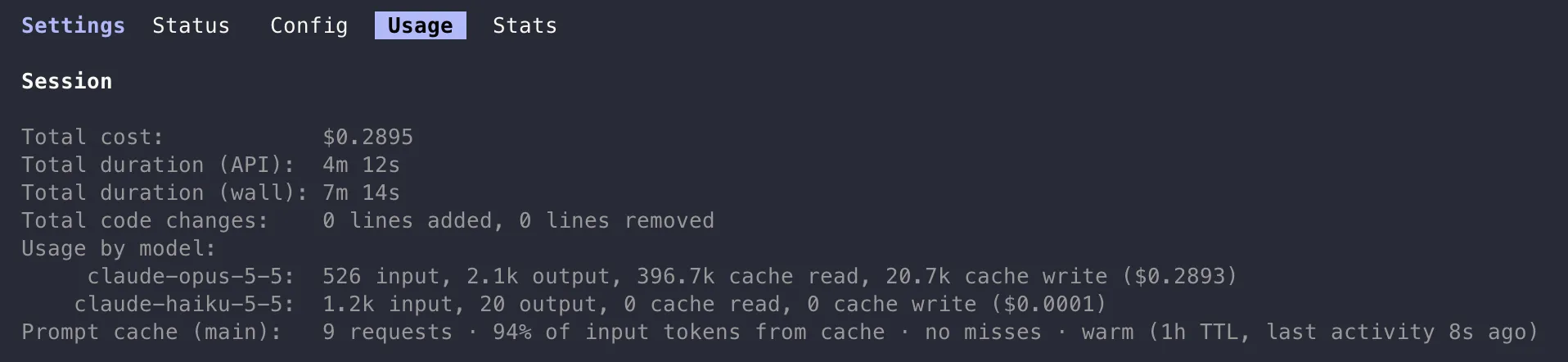
/usage has a Prompt cache (main) line in its Session block (v2.1.251 and later) with the hit rate, the misses, whether the cache is warm or cold, and the TTL in use. Here is what it looks like in the terminal at the end of a short session:
/usage in the terminal: the Prompt cache (main) line sums up the cache of the session
The Prompt cache (main) line says it all: 9 requests, 94% of the input tokens read from the cache, no misses, and the cache is still warm with the 1 hour TTL of a subscription. The Opus line also lets you check the math of this post: 396.7k tokens read at $0.20 per million, 20.7k written at $8 (1 hour TTL), 526 uncached at $4 and 2.1k of output at $20 add up to the $0.2893 shown. Without the cache, the same 418k input tokens would have cost about $1.67 instead of $0.25.
Even better, your status line can show it permanently, so you know if the cache is cold before you send a message. You don’t even have to write the script: type /statusline followed by what you want, and Claude Code generates it for you.
plaintext
/statusline show the prompt cache status: warm or cold, the TTL and the minutes left before it expires
The script reads the prompt_cache object Claude Code passes to your status line (v2.1.251 and later): warm, ttl, expires_at, hit_ratio, and the most useful one here, recache_tokens_if_cold, the number of tokens your next request will rewrite if the cache has gone cold. The status line also refreshes by itself when the cache reaches expires_at, so it flips to cold without you doing anything.
To see which TTL you get, run a one-shot request and look at the usage block:
bash
claude -p "hello" --output-format json
usage.cache_creation.ephemeral_1h_input_tokens versus ephemeral_5m_input_tokens tells you which TTL was written.
What you want to see in a healthy session: cache_read grows turn after turn, because it covers everything before, and cache_creation stays small, because it is only what the last turn added. If cache_creation is close to the full conversation on every turn, something keeps changing the beginning of the prompt.
If you export Claude Code metrics, the claude_code.token.usage metric has a type attribute
with the values input, output, cacheRead and cacheCreation, and the
claude_code.api_request event carries cache_read_tokens and cache_creation_tokens. See the
monitoring docs.
Prompt caching comes down to one rule: the server reuses the longest unchanged beginning of your prompt, for as long as the entry lives. Reads are almost free, writes cost more than normal input, and a cold miss on a big session costs more than having no cache at all.
In practice, that gives a few habits:
Pick your model at the start of a session, and use subagents for cheaper models instead of switching with /model.
After a long break, ask yourself if you still need the old context. If not, /clear instead of continuing or compacting.
Keep big command outputs out of the conversation. They are reread on every turn, cheap per turn but it adds up, and they fill your context window.
Watch out for overage. Once you use usage credits, the main conversation drops to the 5 minute TTL. Set promptCacheTtl to 1h if you take long breaks.
Compact early, between two tasks and while the cache is warm, to keep the context small.
Keep /advisor off. Every call rereads the whole conversation without any cache, and you don’t control when it happens.
Put the cache status in your status line, so you know when your next message will be a cold one.
Here is the whole post in two minutes, to rewatch or to share. Each chapter button jumps to its part.